
PDF vs JPG: Which Should You Send?
Updated by Khokhar Sab
Send a PDF for documents: anything with text, several pages, or a layout that must stay put. Send a JPG for a single photo or picture to view or post. The numbers below show why. To switch, use JPG to PDF or PDF to JPG, both free in your browser.
What is the difference between PDF and JPG?
A JPG is a single picture: a grid of colored pixels, compressed to save space. A PDF is a document of one or more pages that can hold real text, drawings and pictures together, each kept in its own form. So PDF text stays searchable, while JPG text is only a picture of letters.
Is a PDF or a JPG smaller?
For text, the PDF is far smaller: our page of typing was 2.7 KB as a PDF, 327.8 KB as a 150 dpi JPG and 855.3 KB at 300 dpi. Five pages were 10.9 KB as one PDF against 1,639 KB as five JPGs. For a photo, the size is the same, because the PDF simply holds the JPG.
| Content | As PDF | As JPG | Note |
|---|---|---|---|
| One page of typed text | 2.7 KB | 327.8 KB | JPG at 150 dpi |
| One page of typed text, sharper JPG | 2.7 KB | 855.3 KB | JPG at 300 dpi |
| Five pages of typed text | 10.9 KB | 1,639 KB | five JPG files at 150 dpi |
| One 12 MP photo | 1,110.9 KB | 1,109.8 KB | the PDF holds the same JPG |
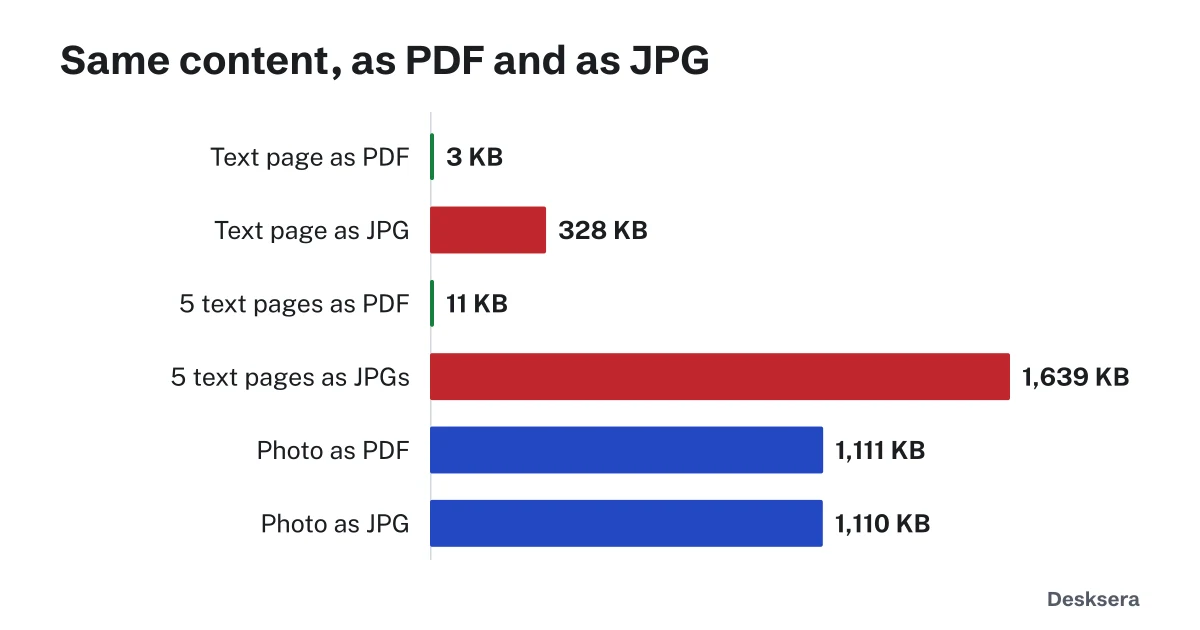
Made 2026-10-12 with this site's PDF code and the sharp image library; the test is in src/data/guides/pdf-vs-jpg.test.ts.
When should I send a PDF instead of a JPG?
Send a PDF for anything that is mainly text or has more than one page: letters, invoices, forms, resumes, contracts, reports and scanned documents. It stays sharp when zoomed or printed, keeps pages in order in one file, can be searched, and can be signed or password protected.
A scanned document is pictures either way; turn it into a PDF with JPG to PDF so the pages travel together, and run OCR PDF to make its text searchable.
When is a JPG better than a PDF?
Use a JPG for one picture meant to be looked at, posted or edited as an image: a photo, a social media post, a profile picture or a picture for a website. Photo apps and websites show JPGs directly. For an ID photo or another picture a form asks for, check the file types it lists.
For iPhone photos in HEIC format, see our guide HEIC vs JPG, or turn them into JPG pictures with HEIC to JPG.
How do I convert between PDF and JPG?
To make one PDF from photos or scans, open JPG to PDF, add the pictures in order and download. To turn PDF pages into pictures, open PDF to JPG, choose the quality and download one JPG per page, or a ZIP for many pages. Both tools work in your browser on a phone or computer, without uploading the files.
Need PNG instead, for sharp screenshots and graphics? Use PDF to PNG or PNG to PDF.
Sending a document? Turn your pictures into one PDF with JPG to PDF.
Tools in this guide
More guides
- How to Scan a Document on iPhone and AndroidFree built-in scanning on iPhone and Android, and how far a phone scan shrinks.
- HEIC vs JPGWhy iPhone photos fail to upload or open, tested in Chrome, and how to convert them free.
- How to Prepare PDFs for a Job ApplicationFormat, one file or several, size limits, file names and checks, with a real pack measured.
Sources and further reading
- Library of Congress: JFIF, JPEG File Interchange Format, Version 1.02: the JPG file format
- Library of Congress: PDF, Version 1.7 (ISO 32000-1:2008): the PDF format