
What PDF Metadata Reveals About You
Updated by Khokhar Sab
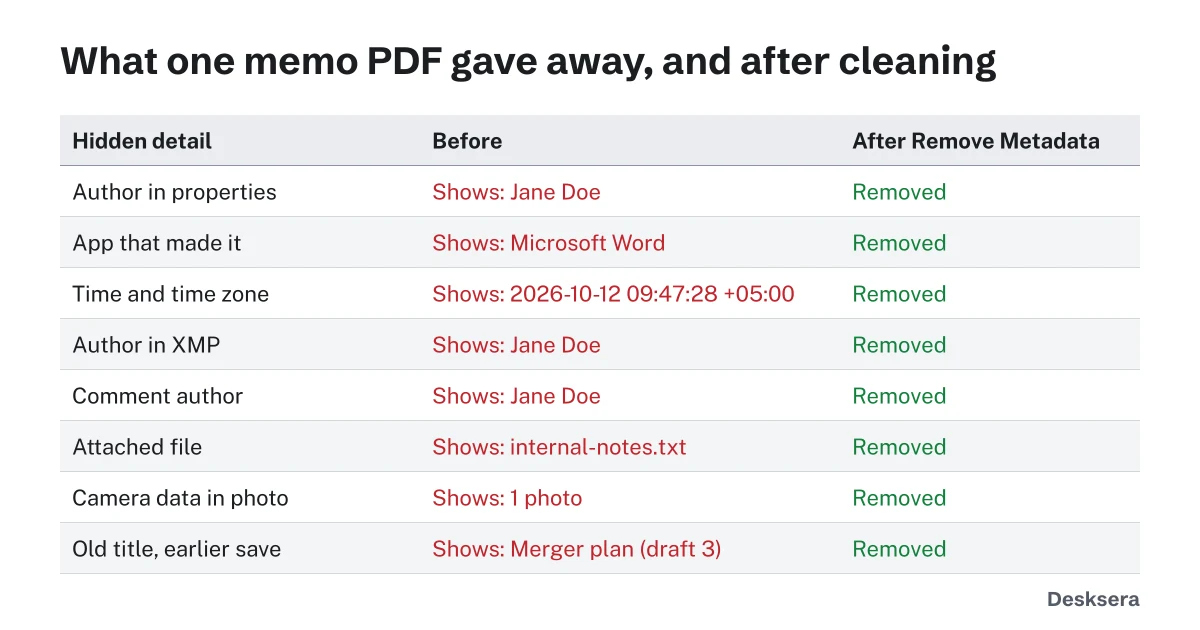
PDF metadata is information stored with a document but not shown on its pages: who wrote it, which app made it, when, and sometimes much more. It travels with every copy you send. We built a one-page memo with eight details that apps commonly leave behind, then read it the way anyone could. To see and clear your own file's hidden data, use Remove PDF Metadata.
What is PDF metadata?
PDF metadata is data about a document stored inside the file but not printed on its pages. The PDF standard has two places for it: the document information dictionary, with fields such as Title, Author, Creator and dates, and an XMP metadata stream in XML. Comments, attachments and the pictures in a PDF can carry their own details as well.
What can PDF metadata reveal about me?
PDF metadata can reveal your name, your organization, the app and version you used, when you created and changed the file, and the time zone of your computer. Comments keep their author's name, attachments keep whole files, photos keep camera data, and an incremental save can keep an earlier version. Our test memo showed all of these.
| Hidden detail in the test memo | What anyone could read | After Remove PDF Metadata |
|---|---|---|
| Author name in document properties | Jane Doe | Removed |
| App that made the file | Microsoft Word | Removed |
| Creation time with time zone | 2026-10-12 09:47:28 +05:00 | Removed |
| Author name in XMP metadata | Jane Doe | Removed |
| Comment author | Jane Doe | Removed |
| Attached file | internal-notes.txt | Removed |
| Photo with camera EXIF data | 1 photo | Removed |
| Earlier title kept by an incremental save | Merger plan (draft 3) | Removed |
For a real-world check, we also exported a short report from LibreOffice 7.6 on our test computer. Its properties named the app (Writer) and version (LibreOffice 7.6) and gave the creation time with the computer's offset from UTC, +05:00, which narrows down where it was made. The time zone is easy to miss.
The old title is the sneakiest. The memo was retitled with an incremental save, which adds changes to the end of the file, so the first title stayed inside: the file held 2 saved versions. Our guide Why Black Boxes Don't Redact a PDF shows the same risk for hidden text.
How do I see the metadata in a PDF?
Open the PDF in a reader and choose File, then Properties or Document Properties, to see the title, author, app and dates. Then open the comments and attachments panels, and click any photo you placed. To see everything at once, including XMP, photo data and saved versions, add the file to Remove PDF Metadata; it lists them before changing anything.
How do I remove metadata from a PDF?
Remove metadata with a tool that deletes it and then rewrites the whole file, so earlier saved versions go too. Our Remove PDF Metadata clears document properties, XMP data, comment authors, attachments, app data, scripts and camera data in photos, then saves a fresh copy. In our test it removed all eight details and left one saved version.
Do it as the last step before sharing, because editing and saving again can add new metadata. If the pages themselves hold private text, use Redact PDF, which also clears metadata that contains the redacted words. Flattening form fields first with Flatten PDF keeps filled-in values from being edited later.
Sending a PDF outside your team? Run it through Remove PDF Metadata first and read the list of what it found.
Tools in this guide
More guides
- Why Black Boxes Don't Redact a PDFA number hidden six ways, found again in five, plus real court and agency failures.
- Is It Safe to Upload a PDF Online?What the FBI warned about free converters, and a one-minute test that shows if a tool uploads your file.
- Why Is My PDF So Large?What takes up the space in a PDF, measured, and how to fix each cause.
Sources and further reading
- ISO 32000-1 (PDF 1.7), section 14.3: Metadata: the document information dictionary and metadata streams
- XMP (Extensible Metadata Platform) documentation: the XML metadata format PDFs carry
- Library of Congress: Exif Exchangeable Image File Format, Version 2.2: the camera data stored in photos