
Why Is My PDF So Large?
Updated by Khokhar Sab
A PDF is large because of what it stores: pictures with more pixels than the page needs, scanned pages saved as photos, fonts embedded in full, or old versions kept after edits. We built test files for each cause and weighed them. To shrink a file now, use Compress PDF, which also shows what your file is made of.
What makes a PDF file large?
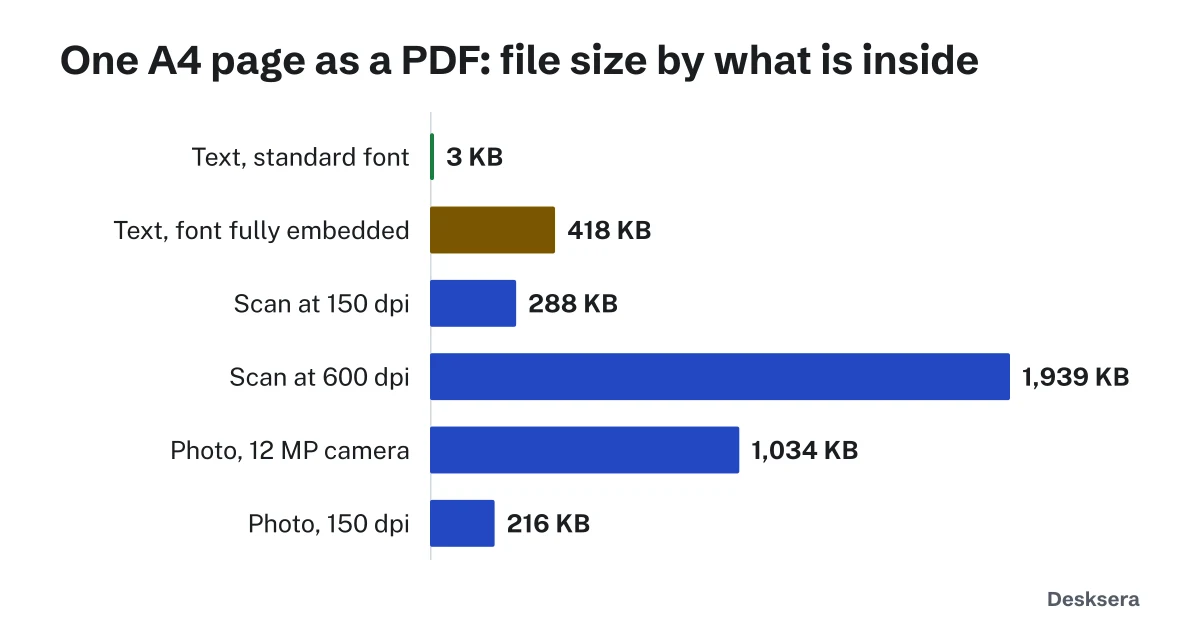
A PDF file is large because of pictures. Photos and scanned pages hold far more data than text, which a PDF stores as letters and positions. In our tests a page of text took 3 KB, while the same page scanned took 288 KB to 1.9 MB. Fully embedded fonts and old versions kept after edits come next.
Why is a scanned PDF so big?
A scanned PDF is big because each page is a photo of paper, stored pixel by pixel, even if it shows only text. Doubling the scan resolution stores about four times the pixels. Our A4 test page grew from 288 KB at 150 dpi to 1.9 MB at 600 dpi, while the same text as real text took 3 KB.
| One A4 page of text | PDF size |
|---|---|
| Real text (typed, not scanned) | 3 KB |
| Scanned in grayscale at 150 dpi | 288 KB |
| Scanned in grayscale at 300 dpi | 759 KB |
| Scanned in grayscale at 600 dpi | 1.9 MB |
For ordinary documents, 150 to 200 dpi is enough to read on screen and to print. In our OCR PDF tests, a page scanned at 200 dpi was read with 95% average confidence. Higher settings help for very small print or for archives, at a cost in file size. Making a scan searchable with OCR adds an invisible text layer of a few kilobytes; it does not make the file smaller.
Do photos make a PDF bigger?
Yes. A photo keeps every pixel the camera took unless something reduces it. Our test photo from a 12 MP camera made a one-page PDF of 1.0 MB. Reduced to what an A4 page shows at 150 dpi, the same picture made 216 KB, and at screen size 101 KB. The page looks the same on screen.
| The same photo filling an A4 page | PDF size |
|---|---|
| 12 MP camera photo (3000 × 4000 px) | 1.0 MB |
| 300 dpi for A4 (2480 × 3508 px) | 756 KB |
| 150 dpi for A4 (1240 × 1754 px) | 216 KB |
| 96 dpi, screen size (794 × 1123 px) | 101 KB |
A page holds the same picture whatever its pixel count, so extra pixels only add weight. At 756 KB, a 300 dpi copy still suits office printing; 150 dpi suits screens and email. This is the main thing Compress PDF changes, and why it shrinks photo-heavy files the most.
Why do fonts make a PDF large?
A PDF can carry its fonts so text looks the same everywhere. A whole font is heavy: in our test, a one-page file with DejaVu Sans embedded in full was 418 KB. Embedding only the letters the page uses, called a subset, made it 10 KB. A standard font that readers already have needs no embedding: 3 KB.
| 40 lines of text on one page | PDF size | Of which fonts |
|---|---|---|
| Standard font, not embedded (Helvetica) | 3 KB | 0 KB |
| Embedded subset (only the letters used) | 10 KB | 6 KB |
| Embedded in full (DejaVu Sans, every glyph) | 418 KB | 379 KB |
Fonts with more characters weigh more when embedded in full; DejaVu Sans covers Latin, Greek, Cyrillic and symbols. If your app's PDF export has a font setting, choose to embed only the characters used.
Why did my PDF get bigger after editing?
A PDF editor can save changes by adding them to the end of the file, an "incremental update" in the PDF standard, so the old version stays inside. When we swapped the picture in a 216 KB file this way, it grew to 435 KB: both pictures were stored, one unused. A rewrite brought it back to 219 KB.
Incremental saves are quick and keep digital signatures valid, which is why editors use them. Each round of edits can add more. Compress PDF rewrites the whole file and keeps only what the pages still use, so it removes those old copies.
How do I make a large PDF smaller?
Find the cause first, then fix that. Compress PDF lists how much of your file is images, fonts and page content as soon as you open it. Reduce pictures with its Balanced or Strong level, rescan heavy scans at 150 to 200 dpi, and remove attachments and hidden data you do not need.
| Cause | What to do |
|---|---|
| Photos at camera resolution | Compress PDF at Balanced (150 dpi) or Strong |
| Scans at 300 dpi or more | Compress PDF, or rescan at 150 to 200 dpi |
| Fonts embedded in full | Export again with font subsets on; compression cannot shrink a font |
| Old versions after edits | Any full rewrite, such as Compress PDF at Light |
| Attachments, thumbnails, app data | Compress PDF drops thumbnails and app data; Remove PDF Metadata removes attachments and hidden details |
| A size limit to meet | Compress PDF for email, or Compress PDF with a target size |
Ready to try it on your file? Open Compress PDF, add the file and read its breakdown before you choose a level.
Tools in this guide
More guides
- How to Scan a Document on iPhone and AndroidFree built-in scanning on iPhone and Android, and how far a phone scan shrinks.
- Email Attachment Size Limits for PDFsEach provider's limit from its own help page, and why a PDF grows 37% inside an email.
- PDF Compression TestFive kinds of PDF at every compression level: size saved and whether text stays readable, with CSV data.
Sources and further reading
- ISO 32000-1 (PDF 1.7): 7.5.6 Incremental updates; 9.6.4 Font subsets; 9.9 Embedded font programs: how PDFs store edits and fonts
- Library of Congress: PDF, Version 1.7 (ISO 32000-1:2008): a plain description of the format and its features
- Our test method: every sample is built from scratch in src/data/guides/pdf-size.test.ts in this site's code and measured with the same code Compress PDF uses