
Why Black Boxes Don't Redact a PDF
Updated by Khokhar Sab
A black box drawn over text in a PDF hides it from your eyes, not from the file. The letters stay underneath, and anyone can copy them, search for them or read them with free software. We hid one number six ways and looked for it again. To remove text for good, use Redact PDF, which deletes what is under each box and checks the result.
Why doesn't a black box redact a PDF?
A black box does not redact a PDF because a page is a stack of separate objects: text, pictures and shapes. Drawing a box adds one more shape on top; the text below is still stored as letters with positions. Viewers paint the box over it, but copy, search and text extraction read the letters directly.
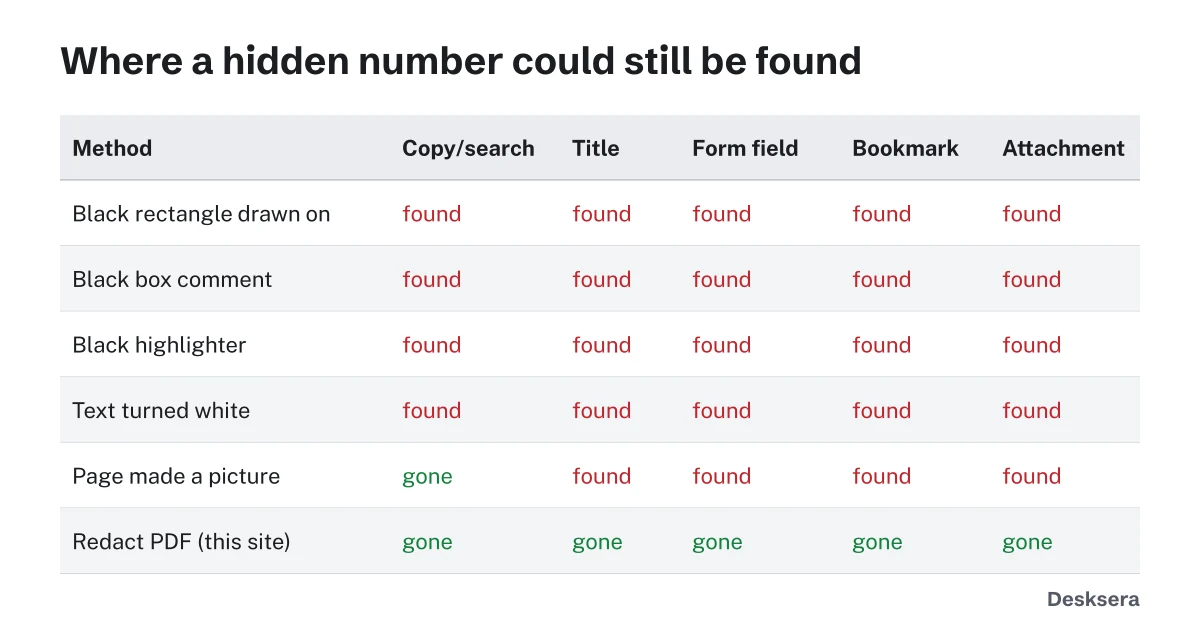
We built a statement holding the number 123-45-6789 in its page text, its title, a form field, a bookmark and an attached file, then hid it each way below. Each result was checked with the PDF code in this site's tests, the same kind of reading any viewer or script can do.
| How the number was hidden | Copy or search | Title | Form field | Bookmark | Attachment |
|---|---|---|---|---|---|
| Black rectangle drawn over the text | Found | Found | Found | Found | Found |
| Black box added as a comment (annotation) | Found | Found | Found | Found | Found |
| Black highlighter over the text | Found | Found | Found | Found | Found |
| Text turned white to make it invisible | Found | Found | Found | Found | Found |
| Page turned into a picture with the box burned in | Gone | Found | Found | Found | Found |
| This site's Redact PDF | Gone | Gone | Gone | Gone | Gone |
Where else can hidden text stay in a PDF?
Hidden text can stay in a PDF's title and other properties, form fields, bookmarks, comments, attached files, and the invisible text layer that OCR adds to scans. Files saved with incremental updates can also keep earlier versions inside. Our page-to-picture test removed the page text yet left the number in four of these places.
Incremental saves deserve a note: some editors add changes to the end of the file instead of rewriting it, so a version from before the redaction can still be inside. Our guide Why Is My PDF So Large? measures the same effect on file size. A redaction tool should rewrite the whole file. To see and clear a file's hidden details on their own, use Remove PDF Metadata.
What happened in real redaction failures?
Two well-documented cases show the pattern. In January 2019, a court filing by Paul Manafort's lawyers had black bars over text that a reporter copied and pasted, revealing what the bars hid. In 2009, a TSA screening procedures manual posted on a federal procurement website had redactions that copying undid the same way. Both used overlays, not removal.
In the Manafort case, the Columbia Journalism Review reported that the blacked-out passages became readable once pasted into a new document, showing among other things that he may have discussed a Ukraine peace plan with an associate more than once. In the TSA case, Network World reported that a contract employee had posted the manual on a public procurement website, and that black boxes in a word processor do nothing to redact text; Washington Technology reported that anyone who copied the document into another format could read the hidden sections. The ABA's Judges' Journal later gathered several such failures and recommended copying and pasting as a basic check.
How can I check that a PDF is really redacted?
Check a redacted PDF in four steps. Search for each hidden word or number. Select the blacked-out area, copy it and paste it into a plain text editor. Open the document properties and look at the title, author and subject. Look for bookmarks, form fields and attachments. If anything shows the hidden text, it was not redacted.
- Open the redacted file in a PDF reader and search (Ctrl+F or Cmd+F) for each redacted word.
- Select text across a black box, copy it and paste it into Notepad or TextEdit.
- Open File, Properties (or Document Properties) and read every field.
- Open the bookmarks, attachments and comments panels, and click into form fields.
Our Redact PDF does the first check for you: after saving, it reads the new file and reports any redacted word it can still find.
What does real redaction do?
Real redaction removes the content instead of covering it. Our Redact PDF turns each marked page into a picture of itself with the boxes burned in, so nothing under a box survives, then deletes matching titles, bookmarks, form values and attachments, and rewrites the file. In our test, the number was gone from all five places.
The trade-off is that a redacted page becomes a picture, so its other text is no longer selectable. You can run OCR PDF on the result to make the rest searchable again; the redacted parts stay black because they are no longer in the picture.
Have a document to redact? Open Redact PDF, mark or search for what must go, and let it check the result. Nothing is uploaded.
Tools in this guide
More guides
- What PDF Metadata Reveals About YouEight hidden details in one memo, from your time zone to an old title, and how to remove them.
- Is It Safe to Upload a PDF Online?What the FBI warned about free converters, and a one-minute test that shows if a tool uploads your file.
- Why Is My PDF So Large?What takes up the space in a PDF, measured, and how to fix each cause.
Sources and further reading
- Columbia Journalism Review: Thank you to everyone who can't redact documents properly (2019): the Manafort filing
- Network World: TSA Gaffe Shows Pitfalls of Redaction (2009): the TSA screening manual
- Washington Technology: In wake of TSA breach, a refresher on redacting PDFs (2009): what went wrong and how to avoid it
- American Bar Association, Judges' Journal: Embarrassing Redaction Failures (2019): several cases and the copy-and-paste check