
PDF Open Password vs Permissions Password
Updated by Khokhar Sab
A PDF can have two passwords. The open password, also called the user password, is needed to open the file at all. The permissions password, or owner password, sets limits on printing, copying and editing once the file is open. They protect very different things, as our test shows. To add either, use Protect PDF.
What is the difference between an open password and a permissions password?
An open password locks the whole PDF: without it, the file cannot be opened or read. A permissions password only sets rules for what people may do after opening, such as printing, copying text or editing, and lets its holder change those rules. A file can have either one or both; with both, either password opens it.
Does a permissions password protect my PDF?
A permissions password does not keep a PDF private. We locked one page with each kind of password using our own Protect PDF code and AES-256 encryption. The permissions-only file opened with no password, pdf.js, the PDF engine inside Firefox, read its text despite the copy limit, and the limits could be removed without the password.
| Check, made without any password | Open password | Permissions password only |
|---|---|---|
| The file opens | No | Yes |
| A PDF engine reads the text | No | Yes |
| The "no copying" limit is stored in the file | Not readable | Yes |
| The limits can be lifted | No | Yes |
| The text is encrypted inside the file | Yes | Yes |
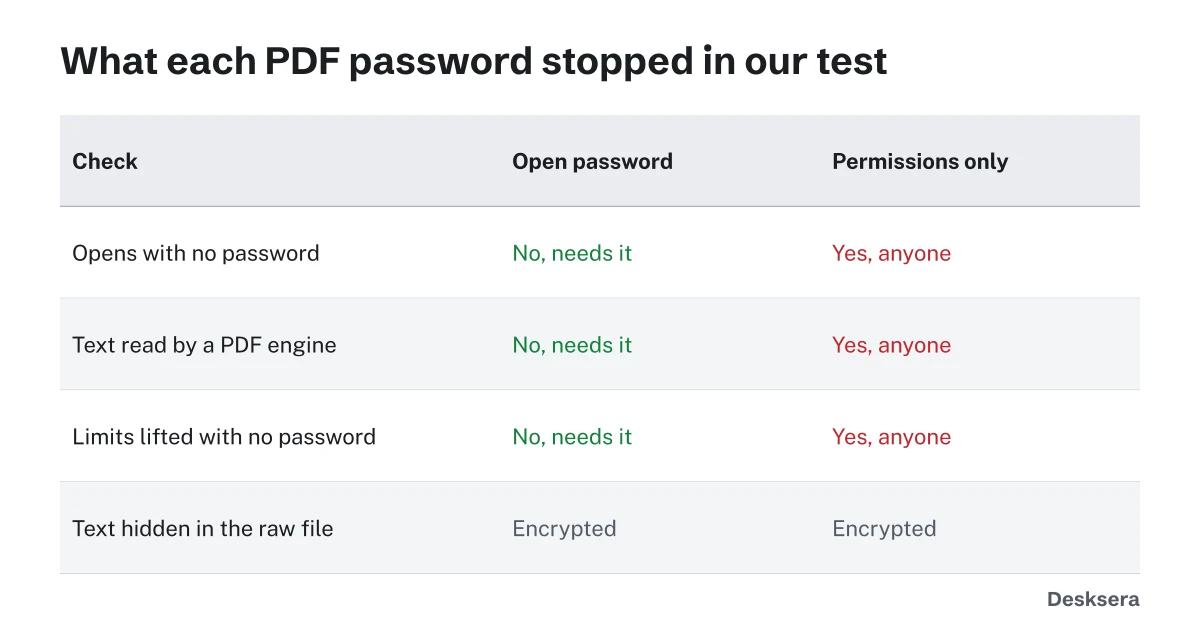
Both files were encrypted inside, but a permissions-only file is encrypted with an empty open password, so every reader can decrypt it. Whether it then refuses to print or copy is up to that reader. Treat permission limits as a polite request that well-behaved apps follow, not as protection.
Which PDF password should I use?
Use an open password whenever the content is private, such as tax forms, contracts or medical records; that is the only one that keeps strangers out. Add permission limits on top if you also want to discourage editing or printing by people you trust with the password. A permissions password alone suits documents meant to be read by anyone.
Our Protect PDF tool sets an open password with AES-256 encryption and, if you want, permission limits, with a separate random permissions password so people who know the open password cannot simply lift the limits.
How strong should a PDF password be?
A PDF password should be long and unique. We suggest a phrase of four or more random words, or at least 12 mixed characters, never a name, date or common word. Once a file leaves your hands, anyone can try passwords against it at leisure, so length matters most. Send the password by a different channel than the file.
Protect PDF shows a strength meter while you type and never stores or sends the password.
What if I forget the password?
If you forget an open password, the PDF cannot be opened, and no honest tool can recover it from AES-256 encryption except by guessing. Keep an unprotected copy somewhere safe, or store the password in a password manager. If you know the password and want it gone, Unlock PDF saves a copy without it.
Our Unlock PDF removes a password you know, or limits on a file you own or have permission to change. It never guesses or breaks passwords.
Ready to lock a file? Open Protect PDF, set an open password, and add limits only if you need them.
Tools in this guide
More guides
- Is It Safe to Upload a PDF Online?What the FBI warned about free converters, and a one-minute test that shows if a tool uploads your file.
- Why Black Boxes Don't Redact a PDFA number hidden six ways, found again in five, plus real court and agency failures.
- What PDF Metadata Reveals About YouEight hidden details in one memo, from your time zone to an old title, and how to remove them.
Sources and further reading
- qpdf documentation: PDF Encryption (version 12.2): user and owner passwords, and why restrictions rely on the reading software
- ISO 32000-1 (PDF 1.7), section 7.6.3: Standard security handler: how open and permissions passwords and the permission flags are stored