
Email Attachment Size Limits for PDFs
Updated by Khokhar Sab
Email attachment size limits run from 20 MB to 25 MB for personal accounts and 35 MB by default for Microsoft 365 work accounts. Those numbers come from each provider's own help page, linked below. A PDF also grows by about 37% on its way through email, so leave room. To get a file under a limit, use Compress PDF for email.
What are the email attachment size limits?
Gmail's limit is 25 MB for personal accounts. Outlook.com's is 20 MB per message, including the message itself. Yahoo Mail's is 25 MB of attachments, sent or received. iCloud Mail's is 20 MB, or 5 GB with Mail Drop. Microsoft 365 work accounts default to 35 MB for sending. Each figure comes from the provider's help page.
| Email service | Limit | What the provider says it counts | Over the limit |
|---|---|---|---|
| Gmail (personal) | 25 MB | Total attachment size | Gmail swaps the files for a Google Drive link |
| Gmail (work or school) | Set by the admin | Admin setting | Ask your admin |
| Outlook.com | 20 MB | Attachments plus the message | Share a cloud link, or compress |
| Microsoft 365 work account | 35 MB to send, 36 MB to receive (default) | The whole message; admins can set 1 to 150 MB | The message bounces back |
| Yahoo Mail | 25 MB | Total file size of all attachments | Compress, split or share a link |
| iCloud Mail | 20 MB | Incoming and outgoing messages | Mail Drop sends up to 5 GB as a link kept 30 days |
Read on each provider's help page on 2026-10-12. Limits change; check the linked pages if a number matters.
Why does my PDF get bigger when I email it?
Email was built for text, so attachments travel as base64: every 3 bytes of the file become 4 letters, and each line of 76 letters gets a line break. That makes the file about 36.8% larger inside the message. In our test, a 3.52 MB scanned PDF became a 4.81 MB email.
| Test PDF | PDF size | Email size | Growth |
|---|---|---|---|
| 10-page text report | 0.02 MB | 0.03 MB | 38.6% |
| 3-page scan | 0.88 MB | 1.21 MB | 36.9% |
| 12-page scan | 3.52 MB | 4.81 MB | 36.9% |
The growth is the same for any file: 4/3 for base64 times 78/76 for the line breaks, or 1.368, as the MIME standard (RFC 2045, section 6.8) sets out. Tiny files grow a little more because the message headers add a few hundred bytes. Microsoft's Exchange Online documentation says messages leaving its datacenters are subject to a 33% encoding increase, and Outlook on the web sends no more than 75% of the configured limit for that reason.
How big can a PDF be to send by email?
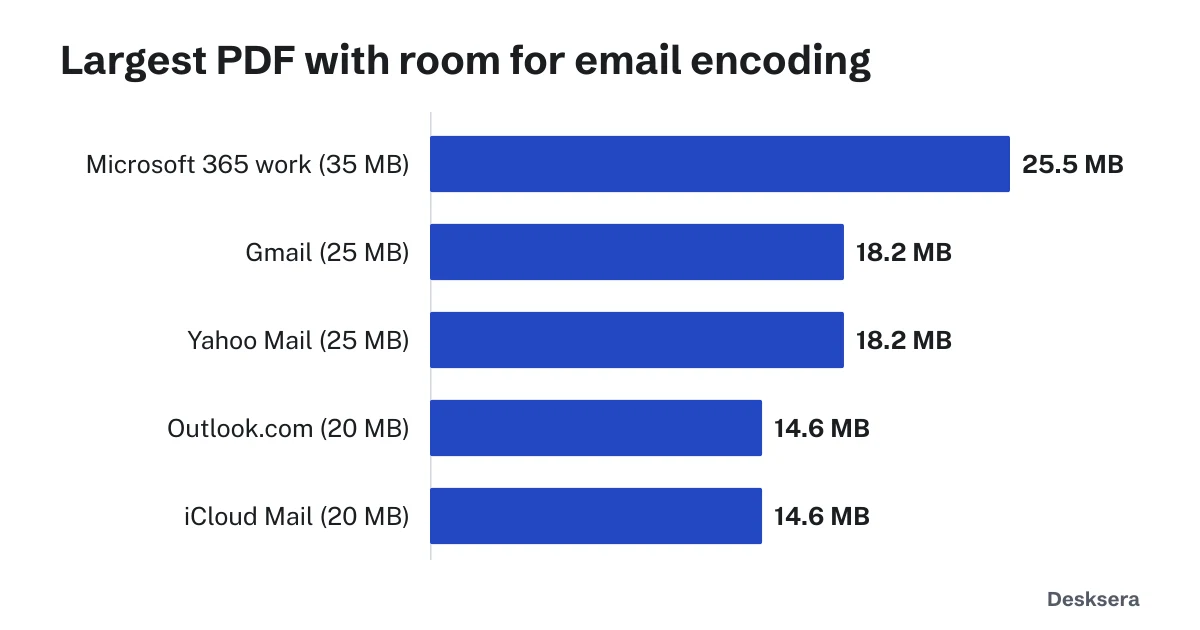
If a limit counts the message as sent, a PDF must be about 27% smaller than the limit: up to 18.2 MB for a 25 MB limit, 14.6 MB for 20 MB and 25.5 MB for 35 MB. Google and Yahoo describe their limits by attachment size and may allow more; these figures are safe either way.
What can I do if my PDF is too large to email?
Compress it first: in our tests scans and photos shrank the most, and Compress PDF for email aims for 10 MB, which stays under every limit here even after encoding. Still too large? Split it and send several emails, or share a cloud drive link. Several attachments count together.
- Compress PDF for email: aims for 10 MB, or type your provider's limit.
- Compress PDF: choose a level or any target size.
- Split PDF: send a long document in parts.
Our guide Why Is My PDF So Large? shows what takes up the space, so you know which fix will work.
Need to send it now? Open Compress PDF for email, add the file, and download a copy that fits.
Tools in this guide
More guides
- PDF Compression TestFive kinds of PDF at every compression level: size saved and whether text stays readable, with CSV data.
- PDF Too Large to Upload?Real scans pushed toward 5 MB to 100 KB limits: what fits, and what to do when compression is not enough.
- Why Is My PDF So Large?What takes up the space in a PDF, measured, and how to fix each cause.
Sources and further reading
- Gmail Help: Send attachments with your Gmail message: 25 MB for personal accounts; Drive link over the limit
- Microsoft Support: Reduce attachment size to send large files with Outlook: 20 MB for Outlook.com, including the message
- Microsoft Learn: Exchange Online limits: 35 MB and 36 MB defaults, and the 33% encoding increase
- Yahoo Help: Message size limits in Yahoo Mail: 25 MB of attachments, incoming and outgoing
- Apple Support: Mailbox size and message sending limits in iCloud; Mail Drop limits: 20 MB messages, 5 GB with Mail Drop