
Electronic vs Digital Signature
Updated by Khokhar Sab
An electronic signature is any electronic mark of agreement, such as a typed name or a drawn signature on a PDF. A digital signature is one kind of electronic signature, made with a certificate and cryptography, that also shows who signed and whether the file changed since. You can add either for free: draw one with Sign PDF, or sign with a certificate in Digital Signature PDF.
What is the difference between an electronic and a digital signature?
An electronic signature is a legal idea: any electronic sign that a person meant to sign. A digital signature is a technical method: a code from the signer's private key and certificate, sealed into the file. A digital signature can serve as an electronic one and adds tamper evidence and signer identity that a picture of a signature cannot give.
What counts as an electronic signature?
In the United States, an electronic signature is an electronic sound, symbol or process attached to a record and adopted with the intent to sign it, under the ESIGN Act. A typed name, a drawn signature placed on a PDF, a ticked box and a recorded "yes" on a call can all qualify. The law looks at intent, not technology.
The EU's eIDAS Regulation defines an electronic signature as data in electronic form attached to other data and "used by the signatory to sign". It then adds two stronger levels. An advanced electronic signature must be uniquely linked to the signer, identify them, be made with data under their sole control, and make "any subsequent change in the data" detectable (Article 26). A qualified electronic signature is an advanced one made with a qualified device and based on a qualified certificate.
How does a digital signature work?
A digital signature works in three steps. The software computes a hash, a short fingerprint, of every byte of the PDF except the signature itself. It seals that hash with the signer's private key. It stores the sealed hash and the signer's certificate inside the file. Anyone can recompute the hash later; if one byte changed, it no longer matches.
The certificate carries the signer's public key, so a reader can check the seal without the private key, which stays with the signer. In our tool the signature and certificates added 15.6 KB to a 1.3 KB contract. The PDF standard calls the covered bytes the byte range; later changes go after them, so a reader can tell the signed version from additions.
What does a digital signature catch?
A digital signature catches any change to the bytes it covers. We signed one contract twice, once with a drawn signature picture and once with a certificate, then changed it three ways. Editing the price inside the file went unnoticed with the drawn signature; the digital signature flagged it. A note saved on top was shown as an addition.
| Change to the signed PDF | Drawn signature | Digital signature |
|---|---|---|
| No change | nothing to check | intact |
| Price edited inside the signed file ($12,000 to $19,000) | not detected | flagged: signed content changed |
| A note added later, saved on top | not detected | intact, with additions flagged |
| File opened and saved again by a basic editor | not detected | no valid signature left |
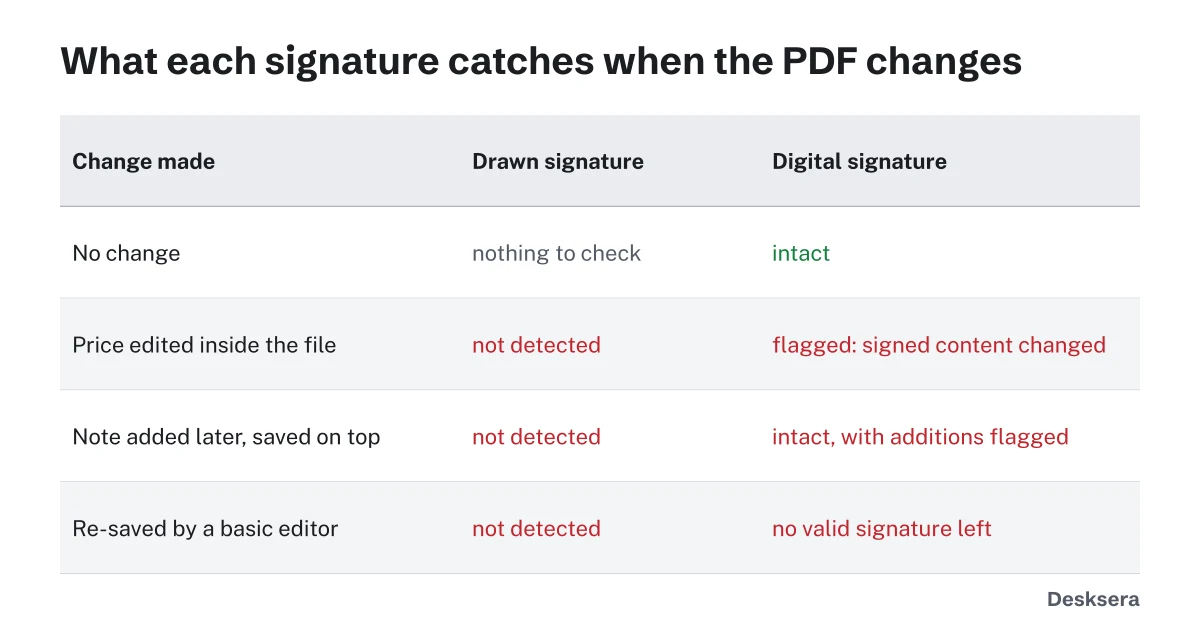
The drawn signature is stored as an ordinary picture, so it can also be copied out of one PDF and pasted into another; nothing ties it to the document. Re-saving a digitally signed file in a basic editor rewrote it, and no valid signature was left. Make every edit first and sign last.
Why does my PDF reader say the signature validity is unknown?
A reader says signature validity is unknown when the document is unchanged but it cannot trace the signer's certificate to an issuer it trusts. Self-signed certificates always show this. It is a question about identity, not tampering. Certificates from issuers on the reader's trusted list, or ones the reader is told to trust, show as valid.
Checking trust also means checking that the certificate was not cancelled, which needs an online lookup. That is why our Digital Signature PDF page checks whether the signed bytes changed and whether each signature matches its certificate, and leaves trust and revocation to your PDF reader.
Is an electronic signature legally binding?
In the US, the ESIGN Act says a signature or contract cannot be denied legal effect solely because it is electronic. In the EU, eIDAS says the same, and gives a qualified electronic signature the equivalent legal effect of a handwritten one. Both have limits, and a contract still needs all its other parts. General information, not legal advice.
ESIGN does not cover some records at all, including wills and testamentary trusts, adoption and divorce matters, court documents, and notices of utility shutoff, foreclosure or eviction, and of health or life insurance cancellation (15 U.S.C. 7003). State laws, such as those based on the Uniform Electronic Transactions Act, also apply. If the stakes are high, ask a lawyer where you live.
Which signature should I use?
Use a drawn or typed electronic signature for everyday agreement where the other side trusts the channel, such as returning a signed form by email. Use a digital signature when you need proof that the file did not change after signing, or when a company, court or government asks for certificate signing. Some EU processes require a qualified electronic signature.
| Situation | A good fit |
|---|---|
| Signing a permission slip or delivery note | Drawn signature with Sign PDF |
| A private sale or a confidentiality agreement between two people | Make it with the bill of sale maker or the NDA template, then sign both copies |
| Approving a document others must not change afterward | Digital signature with Digital Signature PDF |
| Your employer or a government issued you a certificate | Digital signature with that certificate |
| An EU process asks for a qualified signature | A qualified signature from a qualified trust service provider |
Have a document ready? Draw your signature with Sign PDF, or sign it with your certificate and check its signatures in the same step.
Tools in this guide
More guides
Sources and further reading
- 15 U.S. Code 7006: Definitions (ESIGN Act): the US definition of an electronic signature
- 15 U.S. Code 7001 and 7003: General rule of validity; Specific exceptions: legal effect, and the records ESIGN does not cover
- Regulation (EU) No 910/2014 (eIDAS), Articles 3, 25 and 26: EU definitions and legal effects, as published in 2014; amended in 2024 by Regulation (EU) 2024/1183
- ISO 32000-1 (PDF 1.7), section 12.8: Digital signatures: byte ranges and how signatures are stored in a PDF